
TECHNICAL SPECIFICATIONS
• Dimensions: 118 mm x 38 mm
• Weight: 228 g
• Motor: Brushless 12V motor, 9000 RPM,
• Battery: Built-in (non-removable) 4050 mAh
• Charging: Supports modern fast-charging standards up to PD 3.0
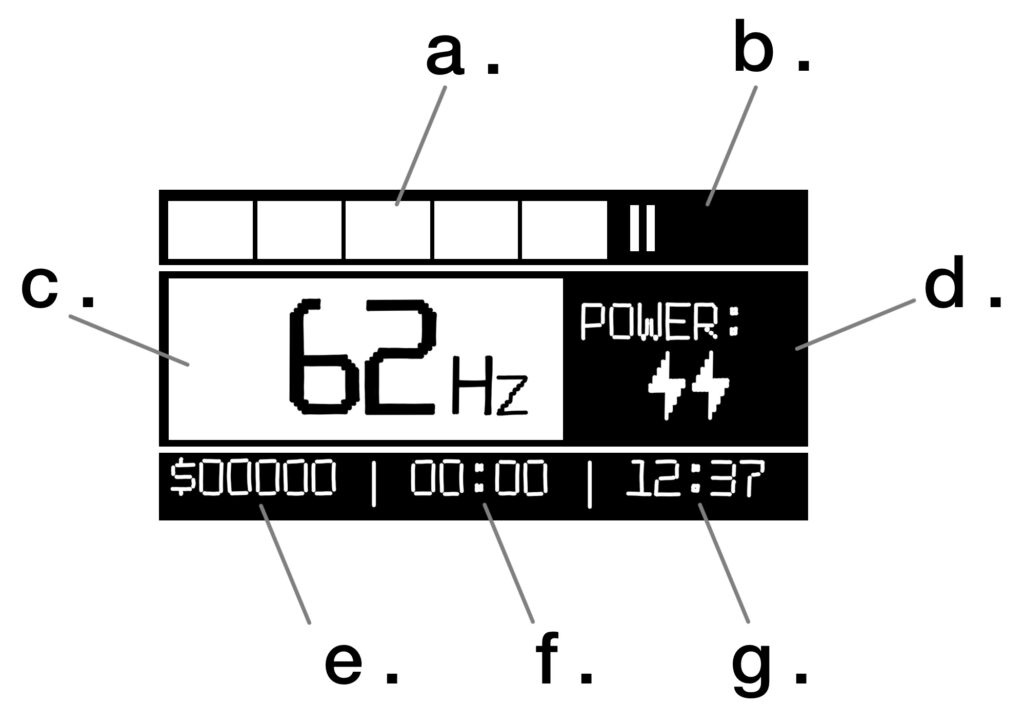
MAIN SCREEN
a. Battery level
b. Status icons
c. Motor speed (Hz)
d. Motor power output
e. Total session cost
f. Active session timer
g. Real-time clock
CONTROL
• Left Button
Click: Decrease Speed (Hz) or Power (Voltage)
• Right Button
Click: Increase Speed (Hz) or Power (Voltage)
• Center Button
Click: Motor ON / OFF
Short Hold: Switch adjustment mode (Hz / Power)
Long Hold: Enter Settings Menu / Exit Settings Menu
Double Click: Enter Presets Menu
• Presets Menu
Click: Load Preset
Short Hold: Save Preset
SETTINGS MENU
• Power Off
Turns off the machine. Note: powering off manually resets the session timer and total cost.
• Power Off Timer
Sets the idle time before the machine automatically powers down. Auto-shutdown via this timer does not reset your session data or cost.
• G-Sensor (Motion Control)
• Tilt Control: Adjust speed by tilting. Flip the machine until you hear a beep. You have 4 seconds to change the angle to adjust speed. Holding the machine at a specific angle locks the speed instantly. Only active when the motor is running.
• Tilt + Stop: Includes Tilt Control features plus an auto-stop function that pauses the motor when the machine is placed horizontally. Press the button to restart.
• Free Hand: Includes all above features plus an auto-start function that triggers the motor as soon as you pick up the machine.
• Tilt Mode (Motion Control)
This mode is activated ONLY with the motor turned on when the tattoo machine is turned upside down. If you continue to hold the tattoo machine upside down, the motor will turn off and enter «cartridge replacement mode.» The motor will turn back on when the machine is returned to its normal working position.
• Off: Tilt control is disabled in this mode.
• Presets: In this mode, you can tilt the screen to select one of three presets you have previously configured.
• Speed: In this mode, tilting the tattoo machine changes the speed.
• Pro: In Pro mode, you can select presets (PRS), speed (SPD), and power (PWR) by tilting the machine. You need to hold the machine tilt on a selected menu item to activate it. Then, tilt the machine to adjust or select the selected option.
• Reset Work Time
Resets the active session timer and the calculated session cost.
• Hour Cost
Set your hourly rate. Features two tracking modes:
• Motor: Tracks only the actual time the motor is running.
• Smart: Tracks motor time and includes up to 10 minutes of break time per hour.
• Coffee Timer
A smart break-management feature. Monitors work-to-rest intervals (default break is 5 min). The system intelligently reduces the upcoming break duration if you take manual breaks. Alerts sound at 3, 2, and 1 minute before the break starts. Once the break begins, the machine locks. To bypass an emergency lock, plug in the charging cable.
• Setup Timer
Set the real-time clock displayed on the main screen.
• Hour Beep
Every hour the tattoo machine will beep if this option is active..
• Buttons Beep
Toggle button press sounds (does not affect system or alert notifications).
• Travel Mode
A safety lock for transport. The device turns off and can only be turned on again after connecting the charging cable. This mode also conserves battery power much more effectively than simply turning the tattoo machine off.
MAINTENANCE & CARE
• Lubrication Reminder: Every 150 hours of operation, the machine will remind you to lubricate it.
• Lubrication Procedure:
Wipe away the old grease using a lint-free paper towel.
Apply a new layer of silicone grease. (If the included grease runs out, you can easily find standard silicone grease at any auto parts store).
• Grip & O-Rings:
If you clean the inside of the grip, always reapply grease to the sealing O-rings.
If you notice increased play (wobble) in the grip, replace the 3 O-rings.
Replacement O-ring specs (available on AliExpress or Amazon): Outer Diameter: 30mm / Thickness: 1mm.
MANUAL
This tattoo machine is designed for buttonless control during operation and utilizes complex motion-tracking algorithms. Here, I would like to introduce you in more detail to what you will encounter when using motion control.
Automatic motor start and stop during operation (you must have the corresponding option enabled in the settings):
Next, for this to work, you simply need to press the motor power button once for the entire session (I also recommend setting the sleep timer to at least 1 hour so the machine doesn’t shut off during your break).
Now, simply place your tattoo machine on the workstation, and the motor will stop on its own after a couple of seconds (if it doesn’t, just lift the machine a few centimeters and set it back down on the surface).
When you are ready to work, simply pick up the machine and tilt it out of the horizontal position — the motor will start.
If you’re working with the machine horizontally, barely moving it, the motor may shut off in your hands. The machine will beep three times before shutting off. Simply make a slight movement with your hand. The machine will recognize that you’re working and won’t turn off the motor until you make a more abrupt movement.
«Tilt» control is activated only when the corresponding option is enabled in the settings. To activate «tilt,» the motor must be running. Next, turn the machine upside down (needle pointing up) — you will hear a beep, and the variable setting will be displayed on the screen.
Then, by tilting the machine toward a vertical position, you can select the desired setting. At first, this may feel a bit unconvenient, as the time until activation (confirmation of choice) is only about 2–3 seconds, or requires holding at the desired option for 1 second. However, you will get used to this fairly quickly.
Attention: keep this in mind when you want to remove the needle or adjust the needle depth, as many tattoo artists flip the tattoo machine over to perform these actions. Initially, this aspect might also seem inconvenient, but believe me — it is well worth it.
Turning the tattoo machine on and off:
To turn on the tattoo machine, simply press and hold the center button. If you press this button briefly, you will see the battery charge level.
To turn off the tattoo machine, go to the settings and select the first option.
Please note that the working time timer and session price are not reset if the machine turns off automatically. However, if you turn the machine off manually, the timer and session cost will reset.